GCash has been transforming how Filipinos manage their finances for 20 years. But there’s more to this financial super app than meets the eye. Here are 20 things you might not know about GCash:
1. GCash Began as a Simple SMS Service When GCash launched in 2004, it was an SMS-based service that allowed users to send money via text.
2. GCash is Used by 94 Million People As of 2023, GCash has over 94 million users, covering a large portion of the adult population in the Philippines, even outside of Metro Manila.
3. GCash’s Reach is Expanding While GCash is primarily available in the Philippines, the app is working to expand its services expanding its reach to 16 international markets. OFWs and Filipinos abroad benefit from cross-border payment solutions.
4. GCash is Helping Drive Financial Literacy Through its in-app resources and partnerships with educational institutions, government agencies, and nonprofits, GCash provides financial education programs. This helps Filipinos manage their money, protect their digital accounts, and make informed financial decisions.
5. GCash is More Than Just an ewallet, it’s a Financial Super App GCash goes beyond sending money. It allows users to pay bills, invest, save, buy insurance, and even trade crypto, all in one app.
6. GCash is a Pioneer in Financial Inclusion GCash has brought digital financial services to millions of underserved and unserved Filipinos, helping them conveniently access relevant and secure financial tools.
7. GCash Pioneered QR Payments in the Philippines In 2017, GCash became the first to launch QR payments in the Philippines, revolutionizing cashless transactions. The feature allows users to make secure payments by scanning a QR code, now widely accepted across businesses.
8. You Can Now Insure Your Money Transfers GCash Send Money Protect (Scam Insurance) insures Express Send money transfers up to PHP 15,000 against fraud. For just PHP 30 a month, you can send money with peace of mind and get protection from social engineering and account takeover scams.
9. GCash Supports Over 200 Local and International Billers GCash’s Pay Bills feature allows users to settle payments with hundreds of billers, from utilities to government services, from the comforts of your home.
10. GCash Enables 6M Merchants and Social Sellers GCash powers payments for over 6 million merchants and social sellers, offering fast, secure, and contactless transactions. By simplifying payments, GCash helps businesses grow and manage their operations with ease.
11. GCash Offers Loans Without the Hassle With GCredit, GLoan and GGives, users can access credit and loans without needing a traditional bank account, offering fast, convenient and fair financial solutions.
12. GCash Helps You Build Wealth with GFunds Through GFunds (formerly GInvest), users can invest in professionally managed funds with as little as PHP 50, making investing accessible to all.
13. You Can Get Crypto with GCash GCash users can buy and sell Bitcoin and other digital currencies via GCrypto, making it easy to dip into cryptocurrency investments.
14. GCash Makes Travel Easier with GSave and Tax Refunds Travelers can get tax refunds on purchases made abroad, particularly in Europe, helping them save while shopping internationally.
15. GCash Jr. Empowers Teens with Financial Independence GCash Jr. gives teens aged 12 to 17 their own e-wallet, allowing them to manage money, make purchases, and pay bills. With exclusive offers and rewards, it helps teens develop smart saving habits early.
16. GCash Innovates with Borrow Load GCash’s Borrow Load feature ensures users never run out of mobile load, allowing them to borrow load credits and stay connected.
17. GCash Launched GSave to Promote Saving Habits With GSave, users can open a savings account with no minimum balance, making it easier for Filipinos to build savings without the hassle of traditional banking.
18. GCash is Pushing Sustainability Efforts Through GForest, users can plant virtual trees with every transaction, which GCash and its partners turn into real trees in our collective pursuit of climate action and socio-economic impact efforts.
19. GCash is Always Innovating with New Features From Send Money Protect to GJobs, GCash is constantly introducing new features that enhance user experience with soon to be launched innovations like Tap to Pay for public transport, and first of its kind in the country, Watch Pay for smartwatch payments.
20. GCash Supports Local Entrepreneurs GCash plays a crucial role in empowering micro, small, and medium enterprises (MSMEs) by providing easy access to digital payments. This helps businesses transition to cashless operations, grow their businesses, and serve their customers.
What’s Next?
GCash has redefined financial management for millions of Filipinos, but its journey is far from over. Expect even more innovative features and expansions as GCash continues to push the boundaries of financial technology.
Stay tuned for more announcements as the #GCash20 celebration continues by following @gcashofficial on Facebook and Instagram.
After their first foray into the AI PC territory just a few months back, ASUS already rolls out an exciting follow-up, this time from their prestigious Zenbook lineup.
The ASUSZenbook S14 (UX5406) is the newest ultra lightweight laptop that the brand has to offer. Staying true to the Zenbook S tradition, this device is another slim and stunning powerhouse of a laptop— a harmony of design and performance.
Yet this machine also transcends tradition with superior AI features joining the exciting power-ups in its form and internals.
We recently got our hands on the Zenbook S 14and we’re excited to share with you our experience. Here are our thoughts on this new Copilot+ PC from ASUS.
Out of The Box
Pulling the mint Zenbook S 14 out of the box, it’s unmistakable that ASUS went extra-premium with this gorgeous laptop.
For starters, this 14-inch Zenbook impressed me right away with its compact size and lightweight body.
It’s just 1.2 kg in weight and 1.1 cm thin so in true Zenbook fashion, it already aces the portability department. And yet the laptop feels sturdy enough and still boasts of military-grade durability.
As for its style, I really like its balance of simplicity and character. The Zumaia Gray color looks great and is complemented by Zenbook’s stylish kintsugi-inspired lines.
But what really makes the design feel even more special is the use of ASUS’ Ceraluminum material. Described as a special aluminum material with ceramic’s rich texture and lightweight nature, it gives the laptop a smudge-free, paper-like feel which I’ve become an instant fan of.
It also comes with the compact 65w USB-C charger and a light gray soft case, ready for on-the-go use fresh from its box.
So if we’re talking style and portability, the Zenbook S 14 easily shines as one of the best-looking lightweight laptops out there.
Stunning Display & Immersive Sound
Opening this slim notebook, the Zenbook S 14 also packs a punch with its 3K ASUS Lumina OLED touch display with up to 120Hz refresh rate.
The ASUS Lumina OLED display’s peak features already make it a stunner, providing crisp details, vivid colors, and deep blacks.
Add the 120Hz refresh rate and the Zenbook S 14 gave me a super smooth and snappy viewing experience.
It’s an immersive Dolby Vision display with 16:10 aspect ratio, 87% screen-to-body ratio, and up to 400 nits SDR and 500 nits HDR peak brightness. It has 100% DCI-P3 color gamut, VESA-certified DisplayHDR 500 True Black, and 1,000,000:1 contrast ratio.
The display looks perfect in indoor settings even under bright lighting. Outdoors, the glossy screen didn’t have much glare when under enough shade, but I did have to push the brightness level up for the best experience.
As a touch display, it is also very responsive and offers stylus support. It isn’t a hybrid laptop though so a stylus would mostly just be handy for quick and precise gestures or in signing documents.
Even with just your finger, the touch screen is still very convenient and can boost your productivity especially if multitasking.
To complement this top-notch display, the Zenbook S 14 is also equipped with four Harman-Kardon certified Dolby Atmos speakers.
The volume and quality of this quad speaker setup is really good for a laptop this compact. In a quiet home office, it’s already clear and loud at 30% volume. Maxing it out and the sound travels far across the room without losing much crispness.
Overall, watching videos, playing casual games, creating content, and simply working with this device is a delight thanks to its impressive display and speakers.
Larger Touchpad, Comfortable Keyboard
The other half of this ultraportable offers a backlit keyboard paired with a large touchpad.
Typing feels comfortable with its 1.1mm key travel while the clicking is very muffled, even when I’m typing away in a flow state. You wouldn’t be bothering anyone when working in a cafe or co-working space.
Keyboard backlight has three levels of brightness in a cool white color, which makes working in darker environments much easier.
You’ll also see the dedicated Copilot Key next to the left arrow key. This will instantly pull up the Copilot AI chatbot for easy AI access.
Onto the touchpad, it offers a sizable room of 5×3” for your fingers to move around.
This works great with the laptop’s gesture controls. Simply swiping on its sides can control volume, brightness, and video playback. It’s a nice touch for added convenience.
Ports & Connectivity
As laptops get slimmer and lighter, the ports are often compromised, but not with the Zenbook S 14.
On the left side are two Thunderbolt 4 ports with display and power support, an HDMI port, and a 3.5mm audio jack. On the right is a USB Type-A port with up to 10GBPS speed. Along with these ports, the Wi-Fi 7 and Bluetooth 5.4 complete the laptop’s connectivity specs.
With the Zenbook S 14, you’ll have no problem with compatibility and speed on both wired peripherals and wireless connections.
Superior Power & Performance
Another thing to love about the Zenbook S 14 is the internal power-up tailored to maximize its AI capabilities and overall performance.
It’s equipped with the Intel Core Ultra 7 processor 258V, 32 GB LPDDR5x RAM, and 1 TB PCIe 4.0 SSD. With up to 47 TOPS NPU performance, generative AI computing is efficient and lightning fast.
With this chipset, you don’t have to worry about app compatibility issues that often limit ARM-based devices. Casual gaming is also an excellent experience, thanks to the laptop’s Intel Arc Graphics.
To test its power, I played games like Valorant, Hades, Little Nightmares, and Honkai Star Rail. Under Performance Mode, they all ran smoothly even when set to their max quality.
That’s already impressive for a laptop this size. As you can imagine, lighter tasks such as browsing and using productivity tools are a breeze with this machine. Not to mention, the AI capabilities, smart gestures, and touch display can really accelerate your working process.
For cooling, it has dual fans with an ultra-slim vapor chamber and geometric thermal grills between the hinge and the keyboard.
Working for long hours with this device didn’t give me any significant heat-up nor did I get fan noise. Just don’t play heavy games for extended periods of time and the laptop temperature remains generally cool.
The 72Wh battery life also supports long working hours. Doing simple productivity tasks like surfing the internet and typing on Docs, the battery went down by 7% to 8% per hour. The same decrease happened when I was streaming videos (Balanced Mode, 70% brightness, 80% sound).
Meanwhile, playing fast-paced and graphics-heavy games in Performance Mode slashed the battery life by 17% to 18% every 30 minutes.
If you need to save more power when using this laptop, you can also switch to Best Power Efficiency Mode.
Charging it up, the 65w USB-C charger juiced up the laptop by about 43% after 30 minutes, completing the full charge in about 2 hours when not in use. When I was using the device, it was already able to charge about 30% on the 30-minute mark.
The Zenbook S 14 isn’t just any ultra-slim charmer, it also matches form with power and performance. Do your daily tasks and play casual games smoothly while enjoying the benefits of its AI features.
The AI Experience
With Intel’s upgraded chipset and 47 TOPS NPU, the Zenbook S 14 has plenty of power for generative AI tasks. As a Copilot+ PC packed with the bells and whistles of a flagship laptop, it didn’t disappoint.
Opening the built-in AI chatbot with the dedicated Copilot button is quick and convenient. Its responses are snappy, direct to the point, up to date, and in my experience were factually correct.
It also cites sources in its claims. I asked it to list links to articles I can read and videos I can watch, and it delivered without issues. It also works in other languages, Filipino included.
As you can expect, there are limits as to how absurd or NSFW your queries can be so the technology will not be abused.
AI image generation is also fast and efficient, whether it’s a realistic image or in a specific style. I also uploaded my own image, and the AI was able to recognize and explain what was depicted in the photo.
Expect further improvements to this service as Microsoft rolls out updates for Copilot+ starting late November this year.
There are also other built-in AI-powered tools that will make your professional and casual use of this device even more convenient.
The Live Captions feature shows real-time captions on your screen, making calls easier to keep up with and note-taking a breeze. This is also complemented by the laptop’s AI Noise Canceling capability for those dealing with disruptive environments.
The Windows Studio Effects, which can be accessed in the Quick Settings of your Taskbar, also prepares you for video calls anytime. It can blur your background and improve your lighting straight from your laptop, and the changes will automatically apply across different platforms such as Zoom, Teams, and Skype.
If you deal with a lot of photos and videos on your laptop, the ASUS StoryCube app offers a more seamless way to organize these files.
It’s a hub that compiles the files from your cloud and devices, helping you manage them with the help of AI recognition. To ensure that your files remain private, StoryCube’s privacy policy states that your photos and videos will stay on your laptop and will not be uploaded to ASUS or any servers.
Another nifty feature I like is how the Zenbook S 14 detects my presence. Whenever I leave the laptop, it goes into Sleep Mode and then wakes up when I get back, even before I touch the device. The FHD Camera’s IR Function will then let me in with its Windows Hello Support.
So, for the sophisticated users wanting to harness the power of AI in a laptop, the Zenbook S 14 delivers what you’re looking for and more.
Our Verdict: The Muse of Today’s AI PCs
The ASUS Zenbook S 14 brings together all the things one could want in a modern laptop: a luxurious look, peak portability, outstanding OLED display, and Intel’s latest chip supercharging its AI capabilities.
Some may find the price steep but for the creatives and professionals who seek the best that money can get in both design and performance, I can see why this ultraportable laptop is a worthy investment and the superior choice.
You can now get the ASUS Zenbook S 14 for P109,995 bundled with a lifetime Office Home 2024, 1-year Microsoft 365 Basic subscription, and 1-month Adobe Creative Cloud subscription.
Your purchase also provides peace of mind with the free ASUS 4A Quality and Service Package, which includes a 2-year international warranty.
If you’re ready for the ASUS Zenbook S 14 experience, you can get your hands on one today through these stores.
Quick Specs
Display
3K ASUS Lumina OLED touch display
Processor
Intel Core Ultra 7 processor 258V
Graphics
Intel Arc Graphics
Neural Processor
Intel AI Boost NPU
Memory
32GB LPDDR5X
Storage
1TB M.2 NVMe PCIe 4.0 SSD
Operating System
Windows 11 Home
Battery
72WHrs, 2S2P, 4-cell Li-ion
Dimensions
31.03 x 21.47 x 1.19 ~ 1.29 cm
Weight
1.2 kg
Ports
1x USB 3.2 Gen 2 Type-A (up to 10 Gbps data speed) 2x Thunderbolt 4 with display and power support (up to 40 Gbps data speed) 1x HDMI 2.1 TMDS 1x 3.5mm combo audio jack
Material
All-metal chassis with ASUS’ Ceraluminum material
Bundle
Laptop sleeve Office Home 2024 (lifetime) 1-year Microsoft 365 Basic 1-month Adobe CC ASUS 4A Quality and Service Package (2-year international warranty)
ASUS Philippines (ASUS) has just unveiled their most advanced ASUS AI PC yet – the Zenbook S 14 (UX5406). This powerhouse laptop seamlessly blends cutting-edge AI capabilities with a head-turning, ultra-portable design, making it the perfect companion for anyone who demands both style and substance. Featuring the latest Intel Core Ultra 7 (Series 2) processor, Ceraluminum™ construction, and cutting-edge AI integrations, the laptop offers seamless multitasking, enhanced performance, and premium user experience.
The Zenbook S 14: Where Elegance Meets Innovation
The Zenbook S 14 isn’t just a laptop; it’s a statement. Encased in Ceraluminum™, a material praised for its durability and lightness, this laptop’s chassis is a marvel of modern engineering, the 14-inch Zenbook is both incredibly slim and light, measuring just 1.1 cm thin and weighing 1.2 kg. It combines robust protection with a luxurious finish in Zumaia Gray, a color inspired by the serene cliffs of northern Spain. This design isn’t just visually appealing—it’s built to withstand the rigors of daily use without succumbing to wear and tear, it also features a unique geometric grille design for added aesthetic appeal and improved cooling.
Powering Through with AI
Powered by the AI-enabled Intel Core Ultra 7 (Series 2) processor and Intel Arc graphics, the Zenbook S 14 delivers up to 47 TOPS of AI performance, ensuring seamless multitasking and faster execution of AI-driven applications. Its advanced CNC milling technology allows for the integration of an ultra-slim vapor chamber into a quiet cooling system, supporting up to 28W TDP with minimal noise, keeping the device cool even under heavy workloads. With 32GB of RAM and 1TB PCIe 4.0 SSD, users can expect fast performance and effortless multitasking, while the 72Wh battery ensures up to 27 hours of all-day productivity. The dedicated Windows Copilot key and enlarged 16:10 touchpad offer intuitive control and more space for smart gesture controls, ensuring a smoother user experience.
Innovations for the Modern User
ASUS doesn’t just innovate; it anticipates needs. The Zenbook S 14 features a full HD 3K 120Hz ASUS Lumina OLED display, perfect for those who spend hours at their screens. Sound is delivered through a Harman Kardon-certified four-speaker system with Dolby Atmos, enveloping users in rich, clear audio. In addition, the laptop’s touchscreen feature provides functional real estate. The ultra-compact Zenbook S 14 features a full set of I/O ports, including two Thunderbolt 4, a USB 3.2 Gen 2 Type-A, HDMI 2.1, and an audio combo jack. WiFi 7 with ASUS WiFi Master Premium certification provides the fastest, most reliable connections, making the Zenbook S 14 the ideal companion for both work and entertainment.
Security is powered by the Microsoft Pluton processor, which offers protected storage for authentication data via Windows passkeys, safeguarding users from cyber threats. The AiSense IR camera enhances privacy and security with facial recognition, Adaptive Lock (which automatically locks the device when you step away), and Adaptive Dimming (which adjusts display brightness based on your presence), ensuring both convenience and security.
On-the-go ASUS AI PC: Vivobook S 14
The Vivobook S 14 (S5406) offers maximum performance in a sleek, minimalist design – created especially for the youthful go-getters. Weighing just 1.3 kg and measuring 1.39 cm thin, its all-metal chassis is built for on-the-go productivity. Powered by up to the Intel® Core™ Ultra 7 processor with an AI engine delivering up to 47 NPU TOPS, it excels in running AI applications, while ASUS IceCool thermal technology with dual 97-blade IceBlade fans ensures peak performance. A dedicated Copilot key provides quick AI assistance, and a 75 Wh battery delivers up to 27 hours of unplugged use for all-day productivity.
Designed with comfort and functionality in mind, the Vivobook S 14 features an ErgoSense keyboard with customizable RGB backlighting and a large ErgoSense touchpad. Paired with WiFi 7 for ultrafast connectivity, a wide range of I/O ports, a 16:10 3K 120 Hz display, and Harman Kardon-certified Dolby Atmos audio, this laptop is ideal for users seeking both power and reliability in a dynamic, lightweight device.
The Vivobook S 14 will be available in November 2024.
The expert’s ASUS AI PC: Expertbook P5
The ExpertBook P5 (P5405)combines a premium aluminum design with lightweight durability, meeting US MIL-STD 810H military standards while weighing just 1.29 kg. Its thoughtful layout, including conveniently placed function keys and a spacious mouse area, optimizes productivity during video conferences and multitasking. With the ASUS ExpertCool thermal structure, it ensures consistent cooling and peak performance, even during extended use. Designed for industry professionals, the ExpertBook P5 is a productivity powerhouse that boosts performance and empowers users to reach their full potential.
Continuing ASUS’ commitment to sustainability, the ExpertBook P5 enhances circularity by 10% through Circular Transition Indicators (CTI), using recycled materials and a modular design to tackle e-waste. It also features ASUS AI ExpertMeet, an on-device AI assistant that transforms meetings with advanced features like AI Meeting Minutes, AI Translated Subtitles, and customizable watermarks for security. Powered by on-device AI, it keeps personal data secure while elevating virtual collaboration for seamless, productive communication.
ASUS proudly introduces the Zenbook S 14 (UX5406), a superior addition to the ASUS AI PC lineup. Crafted from Ceraluminum in the sleek Zumaia Gray colorway, this stylish laptop perfectly balances durability and elegance.
Powered by the Intel Core Ultra 7 Processor 258V with Intel AI Boost NPU, the Zenbook S 14 delivers up to 47 TOPS of AI performance and stunning visuals with Intel Arc Graphics.
Each purchase includes an exclusive ASUS laptop sleeve, a lifetime subscription to Office Home 2024, 1-year subscription to Microsoft 365 Basic, and 1-month membership to Adobe Creative Cloud. The Zenbook S 14 also comes with the widely celebrated ASUS 4A Quality and Service Package, which includes a 2-year International Warranty.
The Zenbook S 14 is now available for PHP 109,995.00 in ASUS Accredited Stores nationwide, offering a perfect blend of style and performance.
An All-Rounder for Every Professional
With its robust build, cutting-edge AI capabilities, and thoughtful design, the Zenbook S 14 is more than just a laptop—it’s a companion for the future-minded professional. It redefines what we can expect from a work device, combining functionality, security, and aesthetics into a seamless computing experience.
For those eager to blend technology with lifestyle seamlessly, the ASUS Zenbook S 14 is not just a tool but a lifestyle upgrade. Ready to transform your tech experience? Visit your nearest ASUS store today or check out their official website for more details.
What started as a simple SMS money transfer has exploded into the financial super app that Filipinos can’t live without! For 20 years, GCash has been rolling out feature after feature, making life easier, faster, and more inclusive for everyone.
From sending money in seconds to paying bills, shopping, and even investing, GCash has completely transformed how we handle money. And guess what? These 20 game-changing features are just a taste of what GCash has to offer! There’s a whole world of services in the app waiting to be explored. Ready to dive into some of the crowd favorites? Let’s begin!
1. SMS Money Transfer This is where it all began! Picture this: it’s 2004, flip phones are the hottest gadgets, and texting is the way to stay connected. Then GCash swoops in and changes the game, letting people send and receive money with a simple SMS/text! GCash made moving money as easy as texting a friend, opening the door to financial freedom for millions. Who knew sending cash could be as easy as sending “LOL”?
2. Buy Load By 2012, smartphones were everywhere, and GCash was right there, keeping up with the times. Enter Buy Load. Now you can reload your prepaid credits anytime, anywhere, straight from your phone! No more rushing to the sari-sari store for load. Today, more than prepaid load, you can also top up mobile data, promos, and other prepaid services like Cignal TV, Konsulta MD, and more. Life just got a whole lot more convenient!
3. Pay Bills Long lines at payment centers? Not here! In 2012, GCash’s Pay Bills feature turned your phone into a personal cashier, letting you pay for everything from electric bills to tuition without leaving home. Missed deadlines? Never again! Just a few taps, and you’re all set. With over 1,900+ billers all in the app to date, how is that for leveling up your money game?
4. Scan-to-Pay QR Remember when cashless payments felt like something out of the future? GCash brought it to life in 2017 with Scan-to-Pay QR, the first of its kind in the Philippines. It made its debut when Globe Telecom’s President and CEO, Ernest Cu, used it for the first-ever payment at Mini Stop (now Uncle John’s). No more scrambling for change, just scan, pay, and go. GCash was at the forefront of the cashless revolution, making shopping faster, easier, and way more fun.
5. eKYC (Electronic Know-Your-Customer) Remember when verifying your identity (KYC) meant standing in line at a store? Well, not anymore! Launched in 2018, GCash’s eKYC feature made getting verified quick, safe, and fully digital. What once required a face-to-face meeting with your ID is now as easy as opening the GCash app, scanning your ID, snapping a selfie, and hitting submit. GCash handles the rest, and boom! You’re verified in no time!
6. GCredit By 2018, GCash wasn’t just about sending money anymore, it was about borrowing it, too! With GCredit, in partnership with CIMB, you could get instant cash when you needed it, with no bank hoops to jump through. Whether it was for an emergency or to pay bills, GCredit had your back!
7. GScore Also, in 2018, GCash launched GScore, and suddenly, your financial world was all about leveling up! The higher your GScore, the more perks you could unlock in your GCash app, like access to more lending products. It’s like your personal power up in the GCash universe, opening doors for more financial freedom! Today, there are 5.4 million unique borrowers, with 1 in 3 borrowers being small business owners and 2 in 3 borrowers being women.
8. GSave In 2018, GSave made saving money a breeze. No paperwork, no bank lines, and with just a few taps, you were saving like a pro. Finally, everyday Filipinos had easy access to banking and financial security at their fingertips. Today, GSave has evolved into a savings marketplace where you can open accounts with BPI, Unobank, CIMB, and Maybank, all within the app. Oh, and did we mention? There are now 10.9 million registered GSave users earning up to 15% interest on savings!
9. GForest What if you could help save the planet while using GCash? In 2019, GForest made that possible! Every transaction earned you points to plant virtual trees that were later turned into real ones. So far, GCash, through its credible local and international partners, has planted 2.8 million trees! With 17 million Green Heroes and 138,000 tonnes of carbon dioxide reduced, GCash is helping the planet while helping you manage your money.
10. GInsure When the world turned upside down in 2020, GInsure was born to give users access to affordable health and life insurance. With just a few taps, getting insured wasn’t intimidating anymore. It was quick, easy, and right in your pocket. Today, GInsure is your one-stop shop for all insurance needs. From life and health to cars, travel, accidents, and even pets—yes, really, among others! And with premiums starting at just PHP 10 a month, it’s one of the most affordable options out there. With over 28.3 million GInsure policies sold and 7.8 million registered users, GCash is making protection accessible for all.
11. GLife Since its launch in 2020, GLife has grown into more than a lifestyle mini-program, it is now a full-blown super app within GCash! What started with shopping and food delivery has expanded into a one-stop shop for everything from travel bookings and entertainment to essential services like bill payment, health, and even insurance. With GLife, you can access a world of services without leaving the GCash app. It’s bigger, better, and more convenient than ever!
12. GGives & GLoan In 2021, GCash took borrowing to the next level with GGives and GLoan. Need that new gadget but don’t want to pay for it all at once? GGives lets you split your payments into easy installments, with select merchants even offering 0% interest! And if you need quick cash, GLoan has you covered with loans up to PHP 125,000. Just a few taps, and boom! Borrowing made simple, straight to your GCash ewallet!
13. GInvest Funds Ever wanted to invest in the world’s biggest companies but thought it was out of your reach? Not with GInvest! Launched in 2021, GInvest, now called GFunds, allows you to participate in the growth of both local and global companies for as low as PHP 50. Whether you’re eyeing top local corporations or global giants, GInvest makes it easy to start investing with just a few taps. Now anyone can build their investment portfolio without leaving the GCash app!
14. GJobs What started as a simple job search feature in 2021 has evolved into a comprehensive platform connecting users with employment opportunities. Now, GJobs, powered by PasaJob, helps job seekers by searching for jobs within the GCash app, offering tailored job listings and resources that streamline the hiring process. Now you can even refer friends and family to jobs and earn a referral fee once successfully placed. This feature facilitates employment and supports the growing gig economy, helping Filipinos find work that fits their skills and lifestyle.
15. Global Pay GCash did not stop at local payments. In 2022, Global Pay took things international! With GCash and Alipay+, cross-border payments became a breeze. Whether you’re shopping online or traveling abroad, GCash turned your phone into a global wallet, accepted worldwide! Keeping things easy no matter where you are.
16. Send Money Protect (Scam Insurance) With digital threats on the rise, GCash teamed up with Chubb to launch Send Money Protect in 2023. This cyber insurance adds an extra layer of security to every GCash Express Send transfer of up to PHP 15,000 for 30 days, shielding you from scams like social engineering, account takeovers, or online shopping fraud. Now, you can send money with total peace of mind!
17. GStocks PH Ever thought investing was too complicated? Not with GStocks PH, it isn’t! Launched in 2023 in partnership with AB Capital, GCash brought the stock market to your smartphone. Now, anyone can invest in Philippine stocks straight from the app, no brokers required.. With 692,000 users and a minimum investment as low as PHP 1,000, it’s investing, simplified, and accessible to all.
18. GCrypto Also, in 2023, GCash dove into the world of cryptocurrency. Buying, selling, and trading crypto became as easy as managing your e-wallet with GCrypto, in partnership with PDAX (Philippine Digital Asset Exchange). The world of digital currencies was now open to everyone, and GCash made it happen, all from your phone.
19. GCash Visa Card GCash didn’t just stop at e-wallets. In 2023, the GCash Visa Card bridged the gap between digital payments and the real world. Whether shopping online or in physical stores, you can tap into your GCash balance wherever Visa is accepted. No hidden charges, the best forex rates, and accepted in over 200 countries and territories, this card has you covered wherever you go!
20. GCash Overseas For Filipinos abroad, GCash Overseas was a total game-changer in 2023. Now, Overseas Filipino Workers (OFWs) and migrants can use GCash even with a non-Philippine SIM. From sending money to paying bills in real-time, GCash keeps you connected to your financial responsibilities back home. Want more control over your money? You can send funds to your family instantly, without service fees, or pay for bills in the Philippines, all from wherever you are in the world.
For 20 years, GCash has been pushing boundaries, but one thing has stayed the same: its mission is to make financial services accessible to every Filipino. From a humble SMS transfer service? to a super app that revolutionized money management, GCash has transformed the way we handle finances—and it’s only the beginning.
These 20 features are just the tip of the iceberg. GCash has even more to offer, with tons of tools and services making life easier every day. As we celebrate two decades with GCash, we can’t wait to see how it will continue shaping the future of finance for the next 20 years and beyond!
The latest innovations in AI have truly revolutionized the digital landscape. This is why when looking for a laptop, an AI PC is a true game-changer in both productivity and creativity.
PC powerhouse ASUS integrates this cutting-edge technology into their already impressive laptops with the new ASUS Vivobook S 15. Aside from being the brand’s first Copilot+ PC and having a Qualcomm Snapdragon X chip powering it, there are a lot of exciting features to unwrap in this AI PC from ASUS.
We recently got our hands on the ASUS Vivobook S 15 (S5507) which runs on the Snapdragon X Plus. Here are our thoughts about this new AI-powered laptop.
First Impressions
Out of the box, the ASUS Vivobook S 15 is a charmer with its 15” surface (13.88″ width x 8.93″ depth) that feels premium to the touch. It has the Cool Silver color which looks clean with just a subtle branding of “ASUS Vivobook” to give it an identity.
The hinge side of the monitor’s back panel also has a slight inward step which is always a nice touch compared to the usual fully rectangle lid of most laptops.
Pulling it out and carrying it around feels just right. It is slim and fairly light at 1.42 kg, but it also has a weight to it that feels premium and sturdy.
I also like that it has a metal chassis, which is more reassuring when I’m out and about compared to having a plastic-bodied laptop in my bag.
Add the flexibility of the device’s 180-degree hinge, and the Vivobook S 15 is a highly portable and efficient productivity companion for students, digital nomads, and workers of different setups, be it at home, onsite, or a mix of both.
Stylish RGB Keyboard & Smart Gesture Touchpad
When you open up the laptop, you’ll be greeted by the 15.6-inch display along with the keyboard and touchpad combo.
The full keyboard offers comfort and speed for both number crunchers and wordsmiths. It offers 1.7mm key travel and minimal sound, perfect for working even in shared spaces.
A dedicated AI button sits beside the arrow keys, keeping your AI tools within reach all the time. More details on this later.
While the laptop’s back panel keeps things simple, the single-zone RGB backlight of its keyboard adds flair to your setup when at work. Set the mood with your chosen color and mode, which is available in Solid Color, Strobing, Breathing, or Rainbow.
The touchpad space is quite generous and comes with smart gestures to control volume, brightness, playback speed, and window navigation.
An Ultra-Vivid OLED Display
Now onto the display, the Vivobook S 15 has a 15.6-inch 3K OLED display (2880 x 1620) with 89% screen-to-body ratio and 120Hz refresh rate.
Combining the OLED display and 3K resolution along with the 100% DCI-P3 color gamut really ups the viewing experience. The colors are vivid, contrast is crisp, and highlights just pop. Streaming videos, gaming, and doing creative work is a delight with this device.
The laptop’s brightness goes up to 600 nits. I tested it under a small shade outdoors and I can still see what I’m working on pretty clearly at maximum brightness. It also has TÜV Rheinland low blue-light certification to ensure your eyes are protected.
This laptop still has the 16:9 aspect ratio, but with this quality of display and other impressive specs and features, I don’t see it as a dealbreaker.
Display is definitely one of the Vivobook S 15’s strongest suits. Whether you’re working in a room or al fresco, this laptop delivers a punchy display to power your productivity wherever you go.
Strong Speakers, Clear Calls, and Swift Connectivity
The Vivobook S 15 comes equipped with Harman Kardon speakers to complement the vivid viewing experience.
Even with the speakers being placed on the underside of the laptop, the sound still comes out loud and clear. When elevated, the sound comes out even better. You can also fine-tune these speakers via the Dolby Access app.
The laptop’s full HD IR camera and microphone with AI Noise Cancellation allow for clearer conference calls. The camera also has a sliding shutter for added privacy and security.
For connectivity, the Vivobook S 15 is also packed with ports for your needs.
On the left are the HDMI 2.1 port, two USB4 Type-C ports with display and power support, a MicroSD card reader, and an audio jack. On the right side are two USB 3.2 Gen 1 Type-A ports and indicator lights.
It also combines Wi-Fi 7 and the Qualcomm FastConnect 7800 technology for an ultra-fast internet connection while its Bluetooth allows you to use three headphones simultaneously.
Powerful & Long-Lasting Performance
Let’s talk about power and performance. The Vivobook S 15 joins the curated lineup of laptops that sport a Qualcomm Snapdragon X chip. In our case, it’s the Snapdragon X Plus, while the pricier S5507-MA032WSM variant has the more powerful Snapdragon X Elite.
Tailored for AI computing, the Snapdragon X lineup proves to be a worthy rising competitor for the Intel, AMD, and Apple M chips.
Both the Snapdragon X Plus and Elite variants of the Vivobook S 15 are also complemented by 16GB of LPDDR5X RAM and 1TB NVMe PCIe 4.0 SSD for peak performance.
Multitasking with productivity tools and browsing with over ten tabs both went smoothly. I also tested video editing tools such as CapCut and DaVinci Resolve, which both worked without issues.
Casual gaming can also be a treat with this device. I played the fast-paced Hades and the 3D game Honkai Impact 3rd, and they both ran smoothly even with Max settings. I did encounter compatibility issues with the game Valorant, which just refused to launch.
I also played Honkai: Star Rail which needed a lower resolution to run without frame drops. Thanks to the OLED display though, the game still looks fantastic and bursting with vivid colors.
ASUS’ IceCool thermal technology also seems to work well, as the laptop didn’t heat up significantly after multiple hours of play and I never noticed any fan noise.
For a closer look in its performance, here are the unit’s benchmark scores while in Performance mode:
Battery life is impressive too. The 70 Wh high-capacity battery promises over 18 hours of use. In my hands-on experience, the battery went down by 10% to 12% per hour when working and streaming (80% volume and 50% brightness). When playing performance-heavy games, it went down 12% to 15% every 30 minutes.
These are with the battery’s Balanced Mode, but you can prolong the use of your laptop with the Best Power Efficiency mode.
It supports USB fast charging and upon trying it out, the laptop juiced up from zero to about 50% in just 30 minutes when not in use. When using it for work or gaming, it charged 50% after an hour.
With the Vivobook S 15, you can do your daily tasks and play casual games anywhere you go for long hours without a hitch. With its AI capabilities, you can do your tasks even faster.
Built-in AI Features
As the first Copilot+ PC from ASUS, the Vivobook S 15 streamlines work and play through its AI features in many ways. With a click of its dedicated key, the Copilot AI chatbot pops up ready to answer queries and requests. No need to go to your browser and type up ChatGPT or Gemini.
When it comes to its responses, the Copilot is often more direct and concise with its answers as long as your questions are specific. It doesn’t go off stretching what could’ve been a short answer like other AI tools seem to do frequently. That is, unless you ask it to.
Its answers are up to date, and I didn’t encounter any inaccuracies when fact-checking the data. If you need references for your research, it will also pull up links you can use. I asked it to give me links about a certain news topic, and it included the articles with thumbnails for easy navigation.
It can also generate images for your presentations or for online content use. For the best results, just keep descriptions clear. I asked it to create an image with specific details and I got it.
As expected, there are limits to how absurd, complicated, or NSFW your prompts can be to avoid abusing the technology. Don’t deliberately push the Copilot’s boundaries and you’ll be fine.
What really impresses me about Copilot though is its speed. Whether it’s answering a question or generating an image, the results are there in just a few seconds.
If you don’t want to type long questions or prompts, just use the microphone like I did, and the responses will also be read out loud by the AI with a very human-like voice. It also supports different languages. I asked it in Filipino via the microphone and it also answered with a fluent Filipino voice.
Outside the chatbox, you can also generate images from your simple drawings with the Paint app, which comes embedded with Cocreator. I just had to sign in and was instructed to download the Image Generation Extension from the Microsoft Store then everything went smoothly from there.
Make some scribbles, type in a prompt to describe it, and tweak the available settings and sliders. Cocreator will then use these as references to create an AI-generated image.
If you’re principled to avoid AI image generators like these though, there are still numerous AI features from this laptop that can boost both your human creativity and productivity.
For creatives and everyday users who always find their devices packed with photos and videos, the ASUS StoryCube app can help.
It compiles all your files from your cloud and devices and then uses AI to recognize the content to help you search, sort, and manage them. There’s nothing to worry too, as their privacy policy clearly states that all content stays in your device and won’t be transmitted elsewhere.
Live Captions is also part of this laptop’s AI arsenal. It captions and even translates calls in real time using AI. It doesn’t seem to support Filipino translation yet, but it’s pretty useful as it is not confined to any app.
You can also rely on the laptop’s AI Noise Canceling capability to keep calls clear. Meanwhile, Windows Studio Effects automatically applies improved lighting and blurred background to whatever platform you’re using, be it Zoom, Teams, Loom, or even with just your laptop’s camera app. It’s very accessible as it also shows up in the Quick Settings of your Taskbar.
For gamers, there’s also the Automatic Super Resolution which uses AI upscaling to help bridge the gap between high graphics and high frame rates for some games.
The Verdict: Highly Portable & Extremely Capable AI PC
The Vivobook S 15 has so much to offer for such a thin and lightweight laptop. It gives you the luxuries of an OLED display, powerful chipset, long-lasting battery, and the impressive AI features of a Copilot+ PC.
While some of these AI tools are available online, having them all in one place through Microsoft and Qualcomm’s trusted technology is such a boost in convenience and confidence.
Plus, its quality also meets its price point, making the ASUS Vivobook S 15 a worthy investment with its AI advantage that you can take anywhere you go.
You can now buy the new ASUS Vivobook S 15 at a price of P69,995 for the Snapdragon X Plus variant and P84,995 for the Snapdragon X Elite variant. It also comes with a free Office Home & Student 2021 and a 1 Year Microsoft 365 Personal subscription.
After your purchase, ASUS also provides peace of mind as this laptop comes with a free 4A Quality & Servicewarranty package.
Get your hands on the new ASUS Vivobook S 15 today through these stores.
Quick Specs
Display
15.6-inch 3K OLED
Processor
Snapdragon X Plus or X Elite
Graphics
Qualcomm Adreno GPU
Memory
16GB LPDDR5X
Storage
1TB M.2 NVMe PCIe 4.0 SSD
Operating System
Windows 11 Home
Battery
70WHrs, 3S1P, 3-cell Li-ion
Dimensions
13.88″ W x 8.93″ D x 0.58″ H
Weight
1.42 kg
Ports
2x USB 3.2 Gen 1 Type-A2x USB 4.0 Gen 3 Type-C (display / power delivery support)1x HDMI 2.1 TMDS1x 3.5mm Combo Audio JackMicro SD card reader
Price
P69,995 (Snapdragon X Plus); P84, 995 (Snapdragon X Elite)
Staring a career may feel like it’s all too overwhelming — things are already highly competitive, and now, AI is entering the picture. It is not uncommon to hear about entry-level office jobs being threatened by the emergence of AI, but this may not be the right way to look at things.
When computers first emerged, similar opinions were circulating. However, these machines did not replace human jobs; instead, they became valuable tools for employees. AI might be viewed in the same light, offering opportunities to learn how to use it to one’s advantage and prepare for future job markets. To take full advantage of the latest advancements in AI, one needs the right tools. Ready to take that career to the next level? Here are the AI PC features to look out for.
AI-Readiness
The first step is to check whether the laptop is an AI PC. The easiest way to do so is to look at the processor. If the CPU features a neural processing unit (NPU), it’s well-positioned to handle AI processes. Options can include most of the latest-generation Intel Core Ultra series processors, the latest laptop CPU offerings from AMD, featuring AMD Ryzen AI, or the Snapdragon processors.
When choosing an AI-powered CPU, consider the TOPS (trillion operations per second) number under its NPU in the specifications table. The ideal is 40 TOPS or more. It would be much better if the laptop were described as a Copilot+ PC. That means the laptop is designed to provide next-level AI experiences with enhanced security, speed, and personalization options. These laptops feature the latest, most up-to-date version of Copilot — the personal AI assistant from Microsoft. They have a dedicated Copilot key on the keyboard and have easy access to Copilot+ features, such as Live Captions, Cocreator, and more.
The latest AI PCs from ASUS also feature a whole lineup of ASUS-exclusive AI-powered smart tools that make all user experiences pleasant. These include the new ASUS StoryCube, ASUS Two-Way AI Noise Cancelation, and ASUS Adaptive Dimming and Adaptive Lock.
Performance for Any Task
Aside from handling AI, the laptop will also need to do well with many other everyday tasks, such as browsing the internet, word processing, or videoconferencing. Depending on the job type, users may also be required to handle slightly heavier tasks, e.g., running creative apps for image or video editing. Additionally, ample storage for large files is a must.
A laptop well-positioned to handle most work tasks will have an exceptional CPU – like an Intel Core Ultra, a latest-generation AMD Ryzen AI 300, or the all-new Snapdragon processors. All the CPUs mentioned above feature NPUs for AI processing and integrated GPUs ready for most everyday tasks, multimedia editing, or light gaming. At least 16 GB of RAM should be used as a solid minimum. Plus, having ample storage space, preferably 1 TB or more, is advisable.
Flexibility for Working Anywhere
The lighter and thinner the laptop, the easier it is to take anywhere. ASUS offers multiple AI PCs that weigh 1.5 kg or less and have a thin profile of around 1.5 cm or less—perfect for on-the-go lifestyles. When it comes to screen size, something like 15.6 – 16 inches proves to be a sweet spot, with plenty of space to work comfortably but nothing too large.
A robust and long-lasting battery is essential to ensure uninterrupted work from any location. The new ASUS AI PCs provide up to at least 18 hours of seamless productivity on a single charge. This allows users to get through the entire workday without carrying a charger, enabling them to travel light and still have enough power for entertainment during their commute home.
Users need diverse I/O ports to fully utilize any workspace, whether at home, in the office, in a coworking space, or a cafe. They should seek a combination of USB4 (preferably with power delivery and display support), USB 3.2 Type-A ports, an HDMI 2.1 slot, and an audio jack. A laptop with a MicroSD card reader is also highly beneficial, particularly for those working with photography or video footage.
ASUS AI PC that Breaks the Barriers
ASUS Vivobook S 15 is the first ASUS Copilot+ PC. Powered by the all-new Snapdragon X Plus processors and with the latest version of the Windows OS and ASUS AI-powered apps, this 15.6-inch laptop offers up to over 19 hours of battery life. The powerful battery and components fit into a 1.47 cm thin, 1.42 kg light chassis with an impressive 3K 120 Hz ASUS Lumina OLED display. It’s a perfect machine for those wishing to use AI to boost productivity or kick off their careers. Available in Cool Silver color and with a sleek, modern design that includes a customizable single-zone RGB keyboard (featuring a dedicated Copilot key), this laptop looks great in any setting. And thanks to a full I/O lineup, users will have ultimate flexibility anywhere ― all at an affordable price of only PHP 69,995, complete with the ASUS 4A Quality and Service warranty.
Garmin announced the Approach® Z30 laser range finder, the latest addition to the Garmin golf ecosystem to help golfers see the course in a new way. This innovative device offers excellent ranging performance and introduces the Range Relay feature, which sends ranged distances to a compatible Garmin smartwatch or theGarmin Golf smartphone app. Once the target has been locked in by the Approach® Z30, the ranged distance and a laser range arc will display on the paired Garmin device to give players a visual indication of the pin position and everything in play around it.
Designed to provide golfers with even more situational awareness on the course, the Approach Z30 delivers fast and precise distance readings1 up to 400 yards away, gives players six times magnification through the viewfinder and vibrates once it locks in on the pin.
“Golfers will love using the Approach Z30, which seamlessly integrates with many other products in Garmin’s ecosystem. You’ll never have to guess your distance to the pin as the Z30 provides quick and accurate measurements and displays them on your compatible smartwatch or smartphone. It’s also an excellent standalone device with its speed and accuracy, making it an exceptional addition for any golfer.” –Dan Bartel, Garmin Vice President of Global Consumer Sales
Elevate your game
Golfers of all skill levels will enjoy the on-course features to help them find more precise distances and have confidence that they’re selecting the correct club.
Key information: View distance from the pin and to the front and back of the green to help gauge how to play a shot2.
PlaysLike distance: See how far each shot should actually play with yardage adjusted for elevation changes. For an even greater level of accuracy, pair with a compatible device to receive PlaysLike distance that factors in air density, which affects how far a ball will travel.
Garmin golf ecosystem: Make the most of the Range Relay feature by pairing the Approach Z30 with the Garmin Golf App, or popular smartwatches including Approach S70, Approach S62, Approach S42, fēnix® 7 series, epix®(Gen 2) series, MARQ® (Gen 2) collection and more.
Tournament mode: An external indicator light lets competitors know that the device is only providing data within the rules.
Magnetic mount: Conveniently store the range finder with an included magnetic mount when riding in a golf cart. It also comes with a handy carrying case with a carabiner, allowing it to hang from a golf bag if walking the course or after a round.
Find My Garmin: If the Approach® Z30 is ever misplaced, players can utilize a feature through the Garmin Golf app to see its last known location.
Designed with all types of golf weather in mind, Approach® Z30 is built with an IPX7 water rating, allowing it to withstand light to steady rain, wind and sunlight. The range finder also features a replaceable battery with exceptional life, providing players with up to a full year of use.
Become a Garmin Golf member
Not only does the Garmin Golf app provide players with premium features on the Approach Z30, but a Garmin Golf membership ($9.99/month or $99.99/year) also gives users access to Green Contour Data, allowing them to see the slope direction of the green on certain courses from their phone or Garmin device. Using the slope information, golfers can figure out how much the ball will release after pitching, know which side of the pin is better to putt from and know the best miss for worst-case scenarios.
Available now, the Approach Z30 laser range finder has a suggested retail price of Php 25,490. To learn more, visit garmin.com/golf.
Engineered on the inside for life on the outside, Garmin outdoor recreation products have revolutionized life for adventurers, athletes, and outdoor enthusiasts everywhere. Committed to developing products that enhance experiences and enrich lives, Garmin believes every day is an opportunity to innovate and a chance to beat yesterday.
AOC, a global leader in gaming monitors and IT accessories and the #1 Gaming Monitor brand for three consecutive years from 2021 to 2023*, is thrilled to announce the AOC Masters 2024, set to take center stage at the Thailand Game Show from October 18th to 20th, 2024. This premier event will bring together top gamers and esports enthusiasts from around the world for an unforgettable weekend of competitive gaming, entertainment, and community engagement.
International VALORANT Tournament Kicks Off with Local Qualifiers
The AOC Masters 2024 will feature an exciting VALORANT tournament with representatives from 10 regions: Australia & New Zealand, Thailand, Indonesia, Philippines, Malaysia, Singapore, Vietnam, the Middle East (MEA), Taiwan, and South Korea. The event will kick off with local qualifiers, giving each region’s top players to realize their dream to play like a pro, competing in a series of competitive events in mid-September 2024 where the exact dates will differ depending on the region. The top two players from each region will earn a coveted spot to represent their country at the main AOC Masters 2024 event in Bangkok on October 19, 2024. This prestigious event’s total prize value will be more than USD 30,000, including a cash prize pool of USD 3000. The qualifying matches will be held in various formats, including 1v1, Tandem Mode, and a 5v5 Show Match. This global high-stakes competition is a testament to AOC’s commitment to fostering local gaming talent and providing elite players with a platform to showcase their skills on the international stage.
Consumer promotion: AOC Masters Consumer Promo
Promo Duration: August 27, 2024 – September 27, 2024
AOC Monitor Philippines is thrilled to announce the AOC Masters Consumer Promo, an exciting opportunity for you to win a spectacular grand prize! Here’s your chance to embark on a thrilling adventure and experience the vibrant culture of Thailand. Don’t miss out!
The Local Philippine qualifier registration is currently ongoing. There are two categories in the Philippine Qualifiers, one is for KOL (Key Opinion Leaders) with a single platform following of not less than 15,000 and combined platforms following of 20,000. The other is for non-professional gamers who have not been a professional for the last 12 months. The winner from each group will be representing the Philippines at the regional playoff to be held at the Thailand Game Show from October 18th to 20th, 2024.
For more information visit the AGON by AOC Facebook page
Cosplay Contest, Mini Concert, and Interactive Booth Activities
The event will offer more than just esports competition. Attendees can look forward to a vibrant cosplay contest showcasing creative fan costumes, as well as a mini concert featuring live performances from popular artists – creating a true festival-like atmosphere. Beyond the stage, the AOC booth will host a variety of walk-in tournaments, including TFT and LoL ARAM. This will allow attendees to participate and compete for exciting prizes. Visitors can also take the opportunity to experience the latest high-performance AOC gaming products firsthand, including QD-OLED monitors AG276QZD2 and AG346UCD, Mini-LED monitor Q27G4XM, Google Monitor with AI features Q27G4XY, and more.
“As a long-standing supporter of the global esports community, AOC is thrilled to present the AOC Masters 2024 tournament,” said Kevin Wu, General Manager at MMD Singapore. “This event embodies our commitment to innovation and fostering elite gaming talent worldwide. We look forward to delivering immersive experiences and showcasing the latest advancements in gaming technology to our passionate fans and players.”
The AOC Masters 2024 at the Thailand Game Show promises an action-packed weekend filled with gaming excellence and entertainment. Whether you’re a seasoned esports fan or new to the scene, this event has something for everyone. Stay tuned for our upcoming local qualifiers and KOL activities, then join us in Bangkok during the main event for an unforgettable experience.
* No.1 Gaming Monitor Brand 2023, according to IDC Quarterly Gaming Tracker: Gaming Monitor 2023Q4 (≥144Hz)
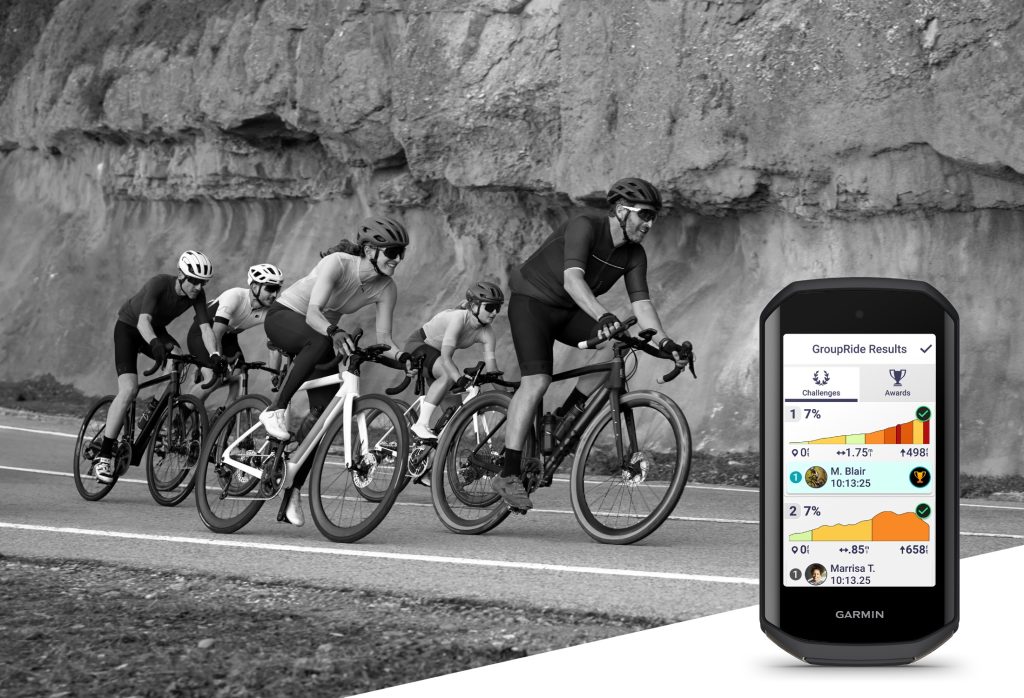
Garmin has unveiled its brightest, smartest, and most connected cycling computer to date with the new Edge® 1050. Boasting a vibrant touchscreen display, the Edge 1050 combines superior navigation, performance tracking, cycling awareness and smart connectivity—all while impressively delivering up to 20 hours of battery life in the most demanding use cases and up to 60 hours in battery saver mode. Packed with features to help foster a more cohesive cycling community, cyclists can receive road hazard alerts reported by fellow cyclists and see in-ride messaging and leaderboards during group rides1. Plus, new additions like on-device course creation, Garmin Pay™, a built-in speaker and more help make every ride better.
“We are excited to introduce our most capable, high-performing bike computer yet with the Edge 1050. Delivering an exceptional in-ride experience, superior navigation and community-focused features, our latest cycling computer is made to keep cyclists motivated—whether they’re planning a group ride with friends or a long, solo adventure.” –Dan Bartel, Garmin Vice President of Global Consumer Sales.
Never stop cycling (together)
Make rides even more fun with features designed to bring the cycling community together.
New improvements to GroupRide1 let riders stay connected with in-ride messaging, live locations, and incident detection alerts2 that can notify and route fellow riders to a cyclist in need of help. Cyclists can also add some competition to their ride with in-ride leaderboards for climbs, plus witty post-ride awards, including Speed Racer (highest max speed), Chatterbox (most heavily using the GroupRide messaging feature), Worker Bee (most time spent pedaling) and more3.
Receive road hazard alerts on-screen that are reported by fellow cyclists – like potholes or fallen trees – and even contribute hazards to help alert other riders1.
These features aren’t exclusive to the Edge 1050, allowing people to create their own communities. GroupRide updates and road hazard alerts will be available on Edge 540, Edge 840 and Edge 1040 series cycling computers soon!
What else is new
Refreshed Design: Angled casing and discrete, all-metal buttons, plus a replaceable quarter-turn mount are complemented by a vivid, 3.5” liquid crystal display.
Garmin Pay Contactless Payments: Don’t worry about digging into your pocket to pull out cash; breeze through mid-ride café or snack stops with a tap of the Edge.
Built-In Speaker: Hear workout and navigation prompts and alert riders and pedestrians ahead using an on-device bike bell.
On-Device Course Creator: Easily create courses right on the device using the responsive touchscreen and toggle different map overlays on or off.
Surface Type: See paved or unpaved roadways on the Edge while riding and get alerts for upcoming unpaved sections.
Ride-Specific Routing: Get routing suited to a specific ride–whether it’s mountain, gravel or road
Map Manager with Wi-Fi Connectivity: Add, swap, or update additional maps via Wi-Fi right on the cycling computer
“I’ve seen a lot of Edge iterations over the years and none have ever had me as excited as the 1050. The user interface on the new Edge is amazing. Whether it’s messages, the weather or Strava segments, everything is quickly available,” shared by Timothy O’Donnell, professional triathlete and Garmin-sponsored athlete. “As an experienced rider, I really appreciate the ease of use of the new Edge 1050. Honestly, new features and tech get harder to use for us old-timers, but the Edge 1050 integrates them perfectly and makes them easily accessible.”
Loaded with advanced training tools, Edge 1050 is ready to help cyclists crush every ride4. Free Garmin training plans – like event adaptive training plans – deliver personalized workouts that adapt based on performance and recovery, while daily suggested workouts provide ride suggestions based on a cyclist’s current training load and VO2 max.
Insights from Firstbeat AnalyticsTM like VO2 max, training status, heat and altitude acclimation and more can help cyclists evaluate their performance and see how their body is holding up, while features like cycling ability and course demands allow cyclists to compare their abilities to the demands of a specific course so they can focus their training in the right areas.
Before heading out, use TrendlinTM Popularity Routing to find the best routes most traveled by other Garmin cyclists, or use preloaded Garmin Cycle Maps that include worldwide mountain bike trail data from Trailforks. Cyclists can also use pin drop navigation to send a POI (“pin”) from Apple® Maps and automatically receive navigation to that location.
Perform at your best
Edge 1050 includes premium performance metrics to help cyclists ride smarter. Real-time stamina insightscan help cyclists closely monitor and track their exertion levels to help influence training efforts or see how much further the current pace can be maintained.
Meanwhile, Power Guide now takes wind data and a cyclist’s current stamina into account to make real-time adjustments to power targets. ClimbPro lets riders see the remaining ascent and grade for each climb – whether riding a course or not – while Climb Explore lets cyclists see nearby climbs on-device or in Garmin Connect. Advanced cycling dynamics provide riders with insights into their performanceand mountain bike metrics, including jump count, jump distance, Grit® and FlowTM, help track every epic ride.
Stay aware, stay connected
For added confidence during a ride, the Edge 1050 includes safety features like LiveTrack and incident detection and is compatible with the VariaTM line of cycling radars and smart lights, as well as inReach® satellite communicators.5 For year-round riding, Edge 1050 easily pairs with Tacx® indoor smart trainers. It can also be customized with data fields, apps and widgets from the ConnectIQTM Store smartphone app.
Available now in all Garmin Brand Stores, Garmin Specialty Stores, Official Lazada and Shopee Stores, Kinetic, and through select authorized Garmin distributors, the Edge 1050 has a suggested retail price of PHP 43,990.
Engineered on the inside for life on the outside, Garmin products have revolutionized life for runners, cyclists, swimmers and athletes of all levels and abilities. Committed to developing technology that helps people stay active and elevate performance, Garmin believes every day is an opportunity to innovate and a chance to beat yesterday.
1 When used with your compatible smartphone and the Garmin Connect™ app
2 When paired with a compatible smartphone; seeGarmin.com/ble. For safety and tracking features requirements and limitations, seeGarmin.com/safety.
3 Postride awards are dependent on a cyclist’s connected sensors
4 When paired with compatible sensors
5 Active satellite subscription is required. Some jurisdictions regulate or prohibit the use of satellite communication devices. It is the responsibility of the user to know and follow all applicable laws in the jurisdictions where the device is intended to be used.
PLDT Home is revolutionizing family connectivity with its new Fiber Unli All Plan1399. This plan has unlimited mobile calls and double internet speeds, ensuring everyone stays connected effortlessly.
2452498243
PLDT Home Fiber Unli All Plans now have enhanced Unli Fam Call, a feature that lets the whole family enjoy free calls and texts from mobile to mobile, unlimited calls from mobile to landline, landline to landline, and landline to mobile. To enjoy this feature, customers cannominate five (5) Smart or TNT numbers as part of the Unli Fam Call.
The Fiber Unli All 1399 deliver sspeeds of up to 100 Mbps, whichis twice as fast as the previous plan at 50 Mbps.
The Fiber Unli All Plan 1399 delivers great value for money – combiningin one bundle a family calling circle and high-speed internet with unlimited Cignal TV– which allows customers to enhance their lifestyle while spending less for their digital services.
Keeping Family Connected
What’s great about the PLDT Home Fiber Unli All plans–theycome in two value-packed optionsto suit the size and needs of thehousehold. The average Filipino household is estimated to have four members, but no two homes have the same internet requirements. Families with young children and teenagers may require more bandwidth for their online leisure activities, while households with work-from-home set up and multiple smart devices may demand higher internet bandwidth.
There are two (2) Fiber Unli All options – the enhanced PLDT Home Fiber Unli All Plan 1399 now at 100 Mbps and Plan 1799 at 200 Mbps. Now customers have more options best suited to their whole family’s internet usage.
PLDT Home Fiber Unli All Plans ensure that Filipino households get the most value for their money by having the right services that they need for the whole family.
The bundle offers endless entertainment from CignalTV’s diverse array of viewing options. With access to a vast selection of channels—including popular movies, TV shows, sports, and kids’ programming—there’s something for everyone in the family to enjoy.
Whether it’s movie night for the singles in their condo, or a family catching up on the latest sports events like the Olympic Games Paris 2024, or keeping the kids entertained with their favorite cartoons and educational shows, Cignal TV guarantees that all members of the household stay engaged and entertained.
PLDT Home Fiber Unli All plans are really designed to keep the whole family connected.To check out the new PLDT Home Fiber Unli All plans, visit this link.